


_.webp)

Managing contractors across multiple sites shouldn't feel like a daily gamble with your organisation's safety record. Yet for operations managers overseeing networks of retail stores, construction sites, or industrial facilities, the question "who's actually on my sites right now, and are they qualified to be there?" rarely has a confident answer.
Site360’s guide shows you how enterprise organisations are transforming contractor management from a compliance headache into a strategic advantage, without adding complexity for the workers on the ground.
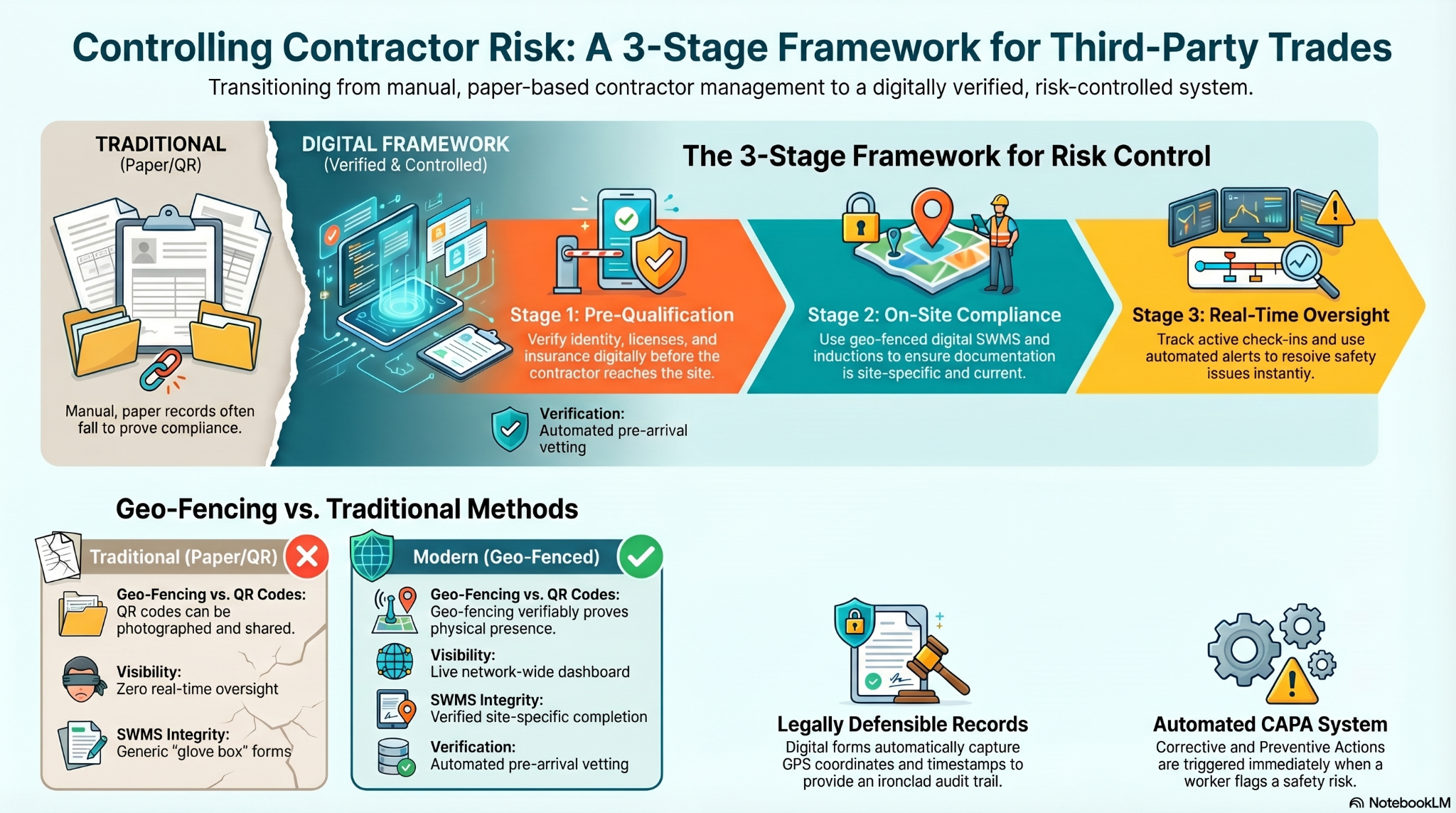
What Is Contractor Management (And Why Traditional Methods Are Failing)
Contractor management is the systematic process of overseeing third-party workers across your sites, from initial vetting and qualification through to on-site activity monitoring and post-visit audit trails.
The challenge? Most organisations are still relying on systems built for a different era:
- Paper-based credentials that sit in glove boxes instead of being verified on-site
- Manual sign-in sheets that provide zero real-time visibility
- Email chains to chase insurance certificates and licences
- Generic inductions that don't address site-specific hazards
- No way to prove a contractor actually completed the required documentation at the right location
When you're managing 10+ sites, this approach doesn't scale. More importantly, it exposes your organisation to preventable risk.
The 3 Critical Stages of Effective Contractor Management
Stage 1: Pre-Qualification: Stop Risk Before It Arrives On-Site
The most powerful lever in contractor risk management happens before anyone sets foot on your property.
What enterprise-grade pre-qualification looks like
- Identity verification for individual contractors
- Business credential checks for contracting companies
- Licence validation specific to the trade and work being performed
- Insurance verification (public liability, workers' compensation)
- Training certification relevant to your industry and hazards
- Automated expiry tracking so credentials don't lapse mid-contract
This is exactly why Woolworths chose their contractor management platform: the ability to verify everything about a contractor and their employing business before arrival, at scale, across their entire network.
The outcome: Risk is driven as close to 0% as possible before a contractor ever arrives. Your site managers aren't gatekeepers checking paperwork; they're focused on operations.
Stage 2: On-Site Compliance: Making Legal Requirements Simple for Everyone
Once a contractor is pre-qualified, the next challenge is ensuring they complete the right documentation, in the right place, at the right time.
Safe Work Method Statements (SWMS): From Glove Box to Geo-Verified
For construction and high-risk work, SWMS are a legal requirement in Australia. The problem? Most contractors carry them on paper in their vehicle — technically compliant on paper, functionally useless for proving where and when work was actually performed.
The modern approach
- SWMS digitised and delivered via mobile app
- Geo-fencing technology that automatically captures the exact location, date, and time
- The worker simply reviews and signs; everything else is auto-populated
- Creates a legally defensible audit trail that proves the SWMS was completed on-site
Unlike QR code systems, geo-fencing verifiably proves physical presence. This matters during incidents, audits, and legal proceedings.
Electronic Work Authority Forms (eWAF): Retail's High-Risk Work Safeguard
Before high-risk work is performed on a retail site, think roof access, electrical work, or working at heights, a Work Authority Form legally documents the hazards, controls, and worker acknowledgments.
Traditionally paper-based, leading retail operators like Woolworths are now deploying electronic WAF systems at a mass scale because:
- Instant deployment across hundreds of sites simultaneously
- Pre-populated site hazard information reduces errors
- Automatic escalation if required controls aren't confirmed
- Full audit trail of who authorised what work, when, and where
For retail operations managers, this transforms a compliance burden into a streamlined, auditable process.
Site-Specific Inductions That Actually Protect Workers
Generic safety inductions fail because they don't address the hazards workers will actually encounter.
What works better
- Each site carries its own induction tailored to its specific hazards
- A worker checking into Site A automatically receives Site A's training
- Site B's different hazards trigger Site B's induction
- Training history stored in the worker profile with full timestamp and location data
- Induction completion becomes a gate; you can't check in without it
This isn't about adding friction; it's about making sure the right information reaches the right person at exactly the right moment.
Stage 3: Real-Time Oversight and Incident Management
The third stage separates basic visitor management tools from true operations platforms.
Flagged Items: Automated Risk Detection and Closeout
When a form answer triggers a risk threshold. For example, a contractor answers "No" to wearing required PPE, advanced systems automatically:
- Flag the issue in real-time
- Assign it to the relevant supervisor
- Track it through to resolution with a full communication thread
- Require photo evidence of corrective action
- Create an audit trail of the entire incident lifecycle
This functions as a corrective and preventive action (CAPA) system, which is an enterprise safety feature that most basic check-in tools simply don't offer.
Live Visibility Across Your Entire Network
The question every operations manager should be able to answer instantly
"Who is on each of my sites right now?"
Modern contractor management platforms, like Site360, provide:
- Real-time dashboard showing all active check-ins across your network
- Filterable by site, contractor company, trade type, or individual
- Alert notifications for non-compliant check-ins or credential issues
- Visit history and location mapping for every contractor
- Exportable reports for WHS audits and compliance reviews
This isn't about surveillance; it's about having the operational intelligence to make informed decisions quickly.
How Geo-Fencing Changes the Contractor Management Game
Here's the technical detail that matters: QR codes prove someone scanned a code. Geo-fencing proves someone was physically at a specific location.
Why this distinction is critical:
- A worker can photograph a QR code and scan it from anywhere
- Geo-fencing creates a verifiable digital perimeter around your site
- Forms can only be completed when the worker's device is physically within the geo-fence
- Every completed form auto-captures GPS coordinates, timestamp, and user ID
- Creates legally defensible evidence that holds up in court and during audits
For risk-conscious enterprises, this isn't a nice-to-have feature. It's the difference between "we have a form" and "we can prove this form was completed on-site, at the right time, by the right person."
Making It Simple for the People Who Actually Do the Work
All the compliance features in the world fail if they're too complex for contractors to use.
The contractor's experience with modern systems
- Download the app once, complete your profile and upload credentials
- Arrive at the site and open the app
- Tap "Check In"
- Geo-fencing handles location verification automatically
- Complete any site-specific forms that pop up
- Get to work
- Tap "Check Out" when leaving
No kiosks. No paperwork. No hunting for site managers to sign forms.
The site manager's experience
- Receives notification of check-ins and any flagged issues
- Reviews compliance status from a mobile device or a desktop
- Everything is pre-configured and built by the platform provider
- No need to learn from builders or configure workflows
- Just tell your provider what you need; they build it for you
This "done-for-you" model is a major differentiator for enterprises that want results without dedicating internal resources to system configuration.
Choosing a Contractor Management System: What Actually Matters
When evaluating contractor management platforms, look beyond the feature checklist.
Essential Capabilities
Pre-qualification dept
- Can it verify both individual and business credentials?
- Does it track expiry dates and send automated renewal reminders?
- Can you set different qualification requirements per site or work type?
Location verification
- Does it use geo-fencing or just QR codes?
- Can it create legally defensible proof of on-site presence?
- Is the location data automatically captured or manually entered?
Form and document flexibility
- Can forms be site-specific and role-specific?
- Is SWMS digitisation supported with auto-population?
- Can you deliver different documents based on the visit reason?
Real-time visibility
- Can you see who's on-site across your entire network right now?
- Are there configurable alerts for non-compliance?
- Does it provide visit history and audit trails?
Incident and corrective action management
- Are risk-triggering answers automatically flagged?
- Is there a closeout workflow with accountability tracking?
- Can you require photo evidence of corrective actions?
Implementation mode
- Do they build and configure everything for you?
- Or do you need to dedicate internal resources to learn the system?
- What's the actual time-to-value?
The Questions Most Buyers Forget to Ask
- "Can you prove a contractor was physically on-site when they completed this form, or just that they scanned a code?"
- "If we have 50 sites with different hazards, can each have its own induction without us building 50 separate forms?"
- "When a contractor's licence expires mid-contract, what happens?"
- "Can we see compliance status across all sites from a single dashboard?"
- "What happens if a contractor answers a safety question incorrectly? Is it automatically flagged and tracked to resolution?"
Common Contractor Management Mistakes (And How to Avoid Them)
Mistake 1: Treating It as a Visitor Management Problem
Visitor management is about knowing who entered your building. Contractor management is about controlling risk from third-party workers performing potentially hazardous work across multiple sites*
The requirements are fundamentally different. Make sure your solution is built for the complexity of contractors, not just visitors.
Mistake 2: Focusing Only on Check-In
Check-in is table stakes. The real value comes from:
- Pre-arrival qualification
- On-site compliance verification
- Post-visit audit trails
- Incident management and closeout
If a platform only solves "who walked through the door," you're leaving the hardest problems unsolved.
Mistake 3: Building Complexity That Workers Won't Use
If contractors need a 20-minute training session to use your system, adoption will fail.
The test: Can a contractor who's never used the system check in and complete required forms in under 2 minutes? If not, you'll face resistance and workarounds.
Mistake 4: Choosing QR Over Geo-Fencing Without Understanding the Implications
QR codes are cheaper and easier to implement. They're also easier to circumvent and provide no verifiable proof of location.
For low-risk visitor management, QR might be fine. For contractor management with legal and safety implications, geo-fencing provides defensibility that QR simply cannot match.
Mistake 5: Underestimating the Value of "Done-For-You" Configuration
Many platforms give you powerful form builders and workflow engines — then leave you to figure out how to use them.
For enterprises managing multiple sites, the hidden cost is internal resource time spent configuring, testing, and maintaining the system.
Platforms that build and configure everything on your behalf convert faster and deliver value sooner.
Industry-Specific Contractor Management Strategies
Construction and Building
Critical focus: SWMS compliance and trade-specific licensing
- Digitise SWMS with geo-verification to prove site-specific completion
- Verify trade licences automatically (electrical, plumbing, scaffolding, etc.)
- Implement high-risk work authority forms for heights, confined spaces, and hot work
- Use scoring systems for daily safety walkthroughs and pre-start checks
Retail Networks
Critical focus: eWAF deployment and multi-site consistency
- Roll out electronic Work Authority Forms for roof access, electrical, and maintenance
- Ensure site-specific inductions reflect individual store layouts and hazards
- Provide the head office with live visibility across all store locations
- Track contractor performance across the network for vendor management
Industrial and Manufacturing
Critical focus: Permit to work integration and hazardous area access
- Integrate contractor check-in with permit-to-work systems
- Restrict access to hazardous zones based on qualification verification
- Require site-specific safety briefings for chemical, electrical, and machinery hazards
- Implement lockout/tagout verification and tracking
Facilities Management
Critical focus: Recurring contractor management and credential tracking
- Automate credential expiry tracking for regular service contractors
- Streamline check-in for repeat visitors while maintaining compliance
- Provide building occupants with visibility of contractor activity
- Track service completion and quality with post-visit forms
Take Control of Contractor Risk Starting Today
Effective contractor management isn't about adding more complexity to your operations. It's about making it easier for enterprises to manage their workforce, easier to keep things legal and safe, and simpler for workers on the ground.
The difference between organisations that control contractor risk and those that merely react to it comes down to three capabilities:
- Verifying everything before arrival — stopping risk at the gate
- Making compliance automatic — geo-verified, site-specific, legally defensible
- Seeing everything in real-time — across every site, from a single dashboard
When you get these three elements right, contractor management transforms from a daily fire drill into a strategic operational advantage.
Ready to see how enterprise-grade contractor management works in practice? Discover how Site360 helps multi-site organisations verify credentials, digitise SWMS and eWAF documentation, and maintain real-time visibility across their entire network, without adding complexity for workers or site managers.
Explore the platform or speak with our team about your specific contractor management challenges.
Frequently Asked Questions
How do you manage contractor compliance across multiple sites?
Use a centralised platform that combines pre-qualification verification, geo-fenced on-site documentation, and real-time visibility dashboards. This allows the head office to set compliance standards once and enforce them automatically across all sites, while site managers get real-time oversight without manual paperwork.
What is the difference between visitor management and contractor management?
Visitor management focuses on knowing who has entered a building for reception and security purposes. Contractor management addresses the full lifecycle of third-party workers performing potentially hazardous work — from credential verification and safety inductions through to work authority documentation and incident tracking. The risk profile and compliance requirements are fundamentally different.
What documents should contractors provide before starting work?
At minimum: proof of identity, relevant trade licences, public liability insurance, workers' compensation insurance, and completion of required safety training. For high-risk work, add Safe Work Method Statements, Work Authority Forms, and site-specific induction completion. These should be verified digitally before site arrival, not collected on paper at the gate.
How does geo-fencing improve contractor management?
Geo-fencing creates a verifiable digital perimeter around your site. Forms and documentation can only be completed when a contractor's device is physically within the geo-fence, and the system auto-captures GPS coordinates, timestamp, and user ID. This creates legally defensible proof that documentation was completed on-site, at the right time, by the right person — something QR code systems cannot provide.
What is a Safe Work Method Statement (SWMS) and why does it matter?
A SWMS is a legal requirement in Australia for high-risk construction work. It documents the tasks to be performed, associated hazards, and risk control measures. Traditionally paper-based, modern SWMS are digitised and geo-verified, proving they were completed on-site rather than sitting in a glove box. This transforms SWMS from a compliance checkbox into a legally defensible safety document.
What is an electronic Work Authority Form (eWAF)?
An eWAF is a digital version of the legal protective disclosure form required before high-risk work is performed on a site, particularly in retail environments. It documents site-specific hazards, required controls, and worker acknowledgments. Electronic versions enable instant deployment across multiple sites, automatic escalation of issues, and full audit trails — making them essential for enterprise retail operations.






_%20Definition%2C%20Calculation%2C%20and%20Examples.jpg)


%20A%20Guide%20for%20Construction%20(Hero).webp)
.png)













.jpg)